
Aspent
Turn Your Database into API with Data API Builder
The need When you don’t want to write a ton of complex code to build an API from scratch, that’s where Azure Data API Builder (DAB) comes in! It’s a fantastic tool that helps you quickly create REST and/or GraphQL APIs directly from your database, without writing a single line of API code.…
 Abhilash Sivaraman
The need
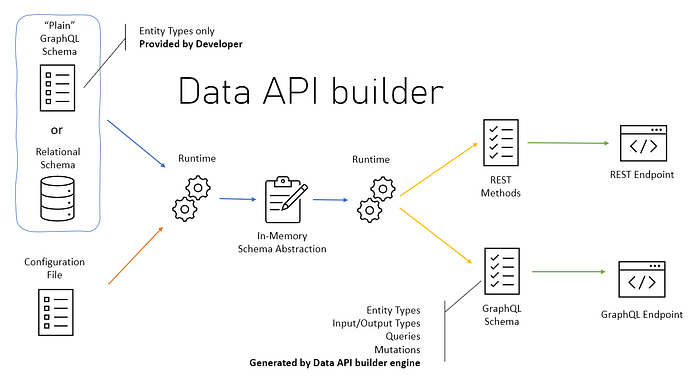
When you don’t want to write a ton of complex code to build an API from scratch, that’s where Azure Data API Builder (DAB) comes in! It’s a fantastic tool that helps you quickly create REST and/or GraphQL APIs directly from your database, without writing a single line of API code. Interesting ! right?
What is Azure Data API Builder?
Think of DAB as a bridge between your database and the applications that need its data. It reads your database schema and automatically generates APIs for you. This means you can focus on building your app’s features instead of spending countless hours on API development.
Why is it Cool?
- Fast API Creation: It automates the process, saving you a lot of time.
- REST & GraphQL: You get to choose the API style that best fits your needs.
- Security: DAB lets you control who can access your data, keeping things safe.
- Database Agnostic: It supports various databases like SQL Server, PostgreSQL, MySQL, and Azure Cosmos DB.
- Configuration Focused: You use a simple configuration file to define your API.
Getting Started:
- **Install DAB: **You can download and install DAB from the official Microsoft site
dotnet tool install --global Microsoft.DataApiBuilder
**2. Connect to Your Database: **You’ll need your database connection string.
**3. Create a Configuration File: **This is where you tell DAB what tables or views you want to expose as APIs. Run the following command in PowerShell:
dab init --database-type mssql --connection-string "Server=your-sql-server;Database=your-db;User Id=your-user;Password=your-password;" --output dab-config.json
Example Configuration (dab-config.json):
{ "data-source": { "database-type": "mssql", "connection-string": "Server=your_server;Database=your_database;User Id=your_user;Password=your_password;" }, "entities": { "Products": { "source": { "type": "table", "object": "Products" }, "permissions": [ { "role": "anonymous", "actions": [ "read" ] } ] } } }
4.Start Data API Builder
Run:
dab start --config dab-config.json
If everything is correct, you should see **DAB running on **http://localhost:5000
5. Test the API
Open your browser and go to:
http://localhost:5000/api/getuserdetails?userId=xxx
If your setup is correct, you should get a JSON response.
6. GraphQL:
- You can use tools like GraphiQL to interact with your GraphQL endpoint. Example query to get all products
query { products { items { id name price } } }
Key Benefits:
- Simplified Development: Focus on your app’s logic, not API plumbing.
- Increased Productivity: Quickly build APIs without writing extensive code.
- Flexibility: Choose between REST and GraphQL.
- Security: Implement role-based access control.
Conclusion:
Azure Data API Builder is a powerful tool that makes building APIs from your database incredibly easy. It’s perfect for developers who want to streamline their workflow and focus on creating amazing applications. Give it a try, and you’ll be amazed at how quickly you can turn your data into a fully functional API!